Upheal vs AutoNotes: AI notes, EHR, and privacy compared

AutoNotes writes therapy notes, cheaply, and it has built a large following doing it. Upheal is an EHR for mental health with the AI inside it. Both are built only for behavioral health, which makes this a closer comparison than most on this site.
The real difference is scope. AutoNotes stores client records and writes notes and treatment plans, and its higher tiers now add scheduling, telehealth and self-pay billing. It does not file insurance claims, so a therapist who bills insurance still runs a separate system for that. Upheal replaces both.
There is also a privacy difference that is worth understanding properly, because it is about what you can read before you sign rather than about anyone behaving badly.
AutoNotes vs Upheal at a glance
| Feature | Upheal | AutoNotes |
|---|---|---|
| AI notes plan | $39/moUpheal AI Notes, alongside any EHR | $19–$49/moNotes $19 (typed or dictated), Workspace $49 (records sessions); $16–$41 billed annually |
| EHR plan | $1/sessionAI notes included; no seat fee$99/mo unlimitedAssistant Pro included | Practice $69/moClient charts, portal and self-pay billing; no insurance claims. $58 billed annually |
| AI progress notes | Unlimited, included | Unlimited on every plan |
| Built for | Mental health only | Mental health only |
| Note from a typed summary | YesOn the free plan too | YesType or dictate on every plan |
| Live session recording | YesBrowser, mobile and desktop apps | Workspace and above, from $49/moNotes tier cannot record at all |
| Client records | Full client chart | Secure client record storage |
| AI treatment plans | Golden ThreadAuto-links to every session note | YesBasic plans on every tier; AI-assisted planning from Workspace |
| Screening tools and assessments | PHQ-9 and GAD-7 with insightsScores explained against the session | Basic forms and screenersWorkspace and above |
| Custom note templates | Smart SectionsYour own prompt per section | Template builderWorkspace and above |
| Compliance Checker | YesAetna + Optum criteria, before you sign | No |
| AI assistant | YesPrep, drafting, scheduling, invoices, messages | Summaries and Q&AFrom Workspace; custom AI workflows on Enterprise |
| Session analytics | Talk time, sentiment, cadence, silences | Session dashboards on every planAdvanced reporting from Practice |
| Scheduling | Included | From WorkspaceCalendar sync; client self-scheduling on Practice |
| Telehealth | Yes, free built-in | From WorkspaceBuilt in; also works with Zoom, Meet, Teams and Webex |
| Billing and insurance claims | LiveClaims, ERAs, eligibility checks | Self-pay billing on PracticeNo insurance claims on their plan grid |
| Client portal and messaging | YesAI drafts from the record | Client portal on PracticeNo client messaging on their plan grid |
| Intake forms | Fully customizableAI import from PDF | On PracticeIntake, consent and discharge forms |
| Languages | 35 transcribed, notes in 7 | English onlyFor recording and transcripts, per their help centre |
| Free plan | YesUnlimited notes + telehealth; some note types and live capture are paid | No7-day trial, no card |
| Jurisdictions covered | HIPAA, PHIPA and PIPEDA, GDPR and DPA | HIPAA and PHIPA |
| Independent attestation | SOC 2 Type IIControls tested by an external auditor | None published |
| Governing privacy policy | PublicReadable and shareable before signup | On requestTheir public notice covers website visitors only |
| AI training on session data | Client opt-in requiredUnseen requests default to opted out; revocable with deletion; therapists on paid plans can disable for all clients | States no training without explicit agreementPublished in their Trust Center, not in a policy you can read |
| Recording control | Delete after the note or keep for supervision | Recordings auto-delete unless you save them |
What AutoNotes is
AutoNotes is an AI documentation platform built exclusively for behavioral health, and its own site puts it at more than 80,000 clinicians. Every plan is HIPAA and PHIPA compliant, and PHI upload is explicitly permitted.
You give it a session three ways: type a summary, dictate one, or upload a recording. From that it produces SOAP, DAP, BIRP, GIRP, PIE, EMDR, group, couples and family notes, plus treatment plans, intake assessments and discharge summaries. Every tier includes a client workspace with session history and basic treatment plan generation; screeners, AI-assisted treatment planning and an AI assistant for summaries and Q&A start on Workspace.
Workspace adds live recording of in-person and virtual sessions, capture from other platforms, custom templates, calendar sync and built-in telehealth. Practice adds full client charts, a client portal, intake and discharge forms, self-pay billing and advanced reporting. Enterprise adds custom AI workflows and automations, custom chart permissions, a front desk role, and SSO and API access.
Scheduling and built-in telehealth, marked coming soon when we checked on 5 September, are now live from the Workspace tier. Their plan grid still lists no insurance claims, eligibility checks or ERAs on any tier.
Where AutoNotes wins
Unlimited notes at the low end, if you know what you are buying
The Notes tier is $19 a month, or $16 billed annually, and includes unlimited typed or dictated notes, basic treatment plan generation, a client workspace with session history and Magic Edit. For a therapist who already has an EHR and writes up sessions from memory, that is a lot of product for the money.
Read the plan grid before you buy it, though, because the Notes tier cannot record a session. In-person recording, uploads and capture from other platforms all start on Workspace. On Notes you type or dictate a summary. That is a real workflow and plenty of therapists prefer it, but it is not the ambient scribe most people picture when they read "AI notes." Notes is also limited to standard note formats; custom templates start on Workspace.
The cheapest tier that actually listens to your sessions is Workspace at $49 a month, or $41 billed annually. Upheal AI Notes, with live capture, is $39 a month (AutoNotes pricing checked 30 September 2026).
Worth knowing on the other side: Upheal's free plan also gives unlimited notes from typed summaries, dictation and uploaded recordings, plus HIPAA-compliant video calls, at no cost. Live capture, some note types and the more advanced tools are what you pay for. So Upheal's free plan covers every input path the Notes tier offers at $19; what Notes adds over our free tier is treatment plans and a client workspace.
Where Upheal goes further
It is the EHR, not a layer on top of one
Scheduling, telehealth, a client portal, intake forms with AI import from PDF, secure client messaging, payments, and insurance claims with ERA processing and eligibility checks are live in Upheal now. On AutoNotes, scheduling and telehealth start on Workspace and a client portal, intake forms and self-pay billing on Practice, but its plan grid lists no insurance claims, eligibility checks or client messaging, so a practice that bills insurance still runs claims somewhere else.
The Compliance Checker
Upheal audits a note against Aetna and Optum documentation criteria before you sign it, and can check PDF notes exported from another system. If a medical necessity element is missing you find out before the claim goes out. AutoNotes publishes no equivalent.
An assistant that does the work between sessions
AutoNotes lists an AI assistant for summaries and Q&A from its Workspace tier, and custom AI workflows and automations on Enterprise. Upheal's AI Assistant is a chat that knows your clients, notes and treatment plans: ask it to prep you for the next session, draft a discharge summary or referral letter from the record, reschedule an appointment, generate an invoice or superbill, chase an outstanding balance, or draft a client message. It shows you what it is about to do and waits for approval. That makes it conversational and agentic. Its free tier comes with every plan, and Assistant Pro, $39 a month or included in the $99 plan, removes the usage limits, including on routines that run on their own, and adds custom reports.
Section-level customization
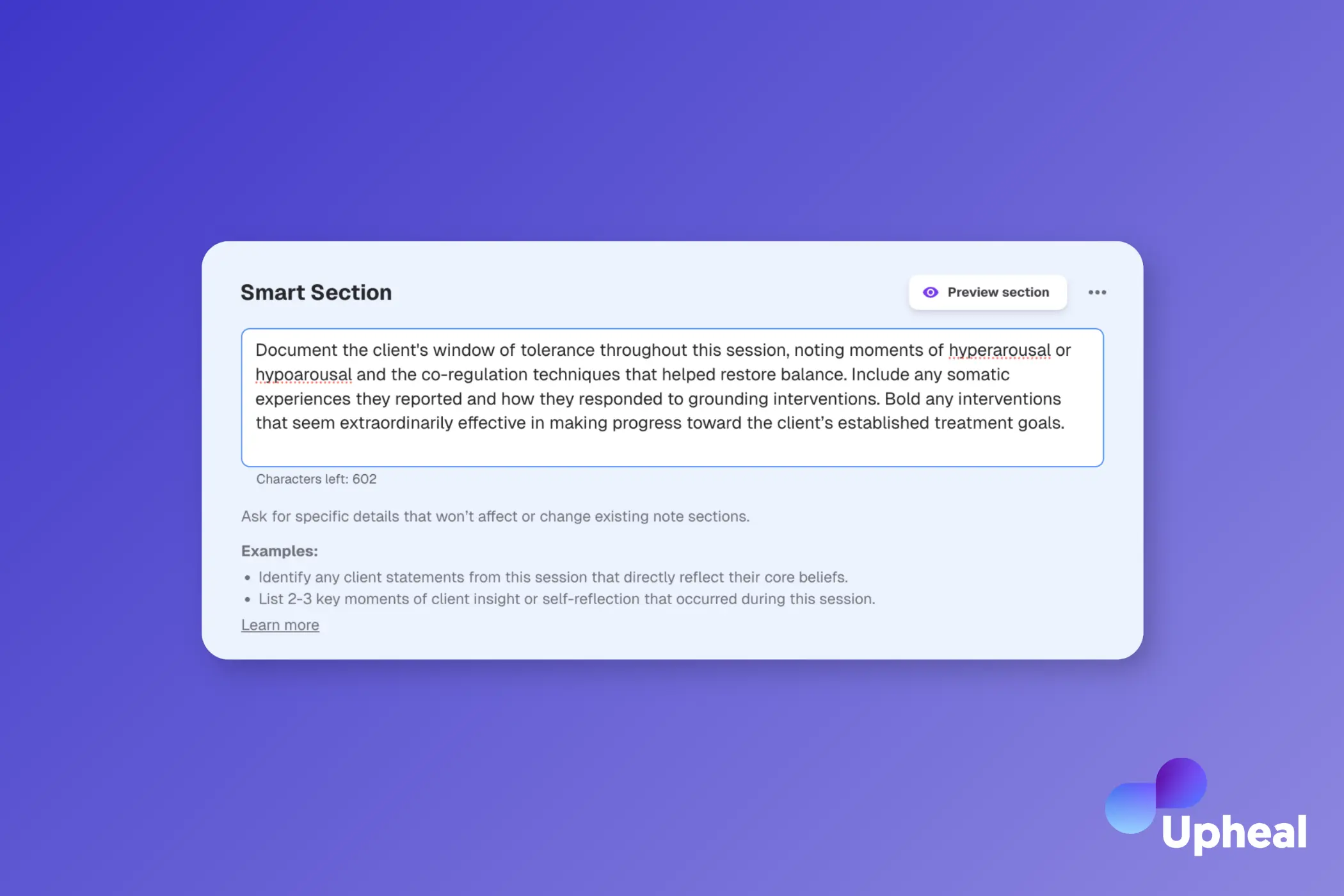
AutoNotes has a custom template builder, so you can shape the structure of a note. Upheal's Smart Sections go a level deeper: you write the instruction for an individual section, and the AI follows it every time. Tell it to always capture the DBT skill practised and the client's response, or to flag avoidance language, and it will.
Session analytics
AutoNotes shows session dashboards and note flags on every plan, and adds advanced reporting and dashboards from Practice. Upheal's session analytics are on the paid plan and work at a different level: talk-time ratio, sentiment, cadence and silences plotted across the session timeline, plus PHQ-9 and GAD-7 scores explained against what actually happened in the room.
Capture and language coverage
Upheal captures in-person sessions through the browser or its iOS, Android and macOS apps, virtual sessions from any browser tab or desktop app, and through its own HIPAA-compliant telehealth. It transcribes 35 languages, follows a session that moves between English and Spanish, and writes notes in 7. AutoNotes records in person and on other platforms from Workspace up, and its help centre says recording and transcripts support English only.
Privacy: what you can read before you sign
Both platforms are HIPAA compliant and sign a BAA. Both let you control recordings. Neither honours browser Do Not Track signals. The meaningful difference is what is published.
What AutoNotes publishes
AutoNotes has a public Website Visitor Privacy Notice, updated 15 July 2026, and it is careful to say what it is not. It covers the marketing site only. The document that governs your clients' session data is a separate Licensed User Privacy Policy, and their notice states that it is not published online because it contains proprietary compliance details, and is available on request from their Privacy Officer.
That is a real limitation and worth naming plainly: a therapist cannot read the governing policy before signing up, cannot forward it to a client who asks, and cannot check that marketing language matches the contract. It is not evidence of bad practice. AutoNotes states HIPAA and PHIPA compliance, BAAs, encryption in transit and at rest, and, in its Trust Center, that customer data is not used to train models without explicit agreement. Those are clear commitments. They are simply made in marketing copy rather than in a document you can hold them to.
On recordings, AutoNotes gives you real control: recordings auto-delete unless you choose to save them.
What Upheal publishes
Upheal's provider privacy policy is public and was last updated 3 December 2025. No session data is used for AI improvement unless the client actively opts in; a client who never sees the request is opted out; consent can be withdrawn and the data deleted; and therapists on paid plans can switch the request off for every client at once. Upheal is HIPAA, PHIPA, PIPEDA, GDPR, and DPA compliant, has completed a SOC 2 Type II audit, and is continuously externally tested. SOC 2 Type II means an independent auditor has tested the controls rather than the vendor describing them. Session recordings are deleted by default once the note is generated, or kept if you choose. Upheal signs a BAA with every practice, and control status is published at trust.upheal.io.
If a client asks what happens to what they say in session, Upheal gives you a document to point at. With AutoNotes you would need to request one first.
Pricing
AutoNotes has four tiers, priced per clinician and verified against its pricing page on 30 September 2026.
Notes, $19/month, or $16/month billed annually. Unlimited typed or dictated notes, core note formats, a client workspace with session history, Magic Edit and basic treatment plan generation. No session recording or uploads.
Workspace, $49/month, or $41/month billed annually. Adds session recording and upload, capture from Zoom and other platforms, built-in telehealth, calendar sync, custom templates, AI-assisted treatment planning, basic forms and screeners, and an AI assistant for summaries and Q&A.
Practice, $69/month, or $58/month billed annually. Adds full client charts and a client portal, intake, consent and discharge forms, roles and supervision, self-pay billing and advanced reporting.
Enterprise, custom pricing with implementation from $2,500, adds custom AI workflows and automations, custom chart permissions, a front desk role, and SSO and API access.
A 7-day free trial runs on any tier with no card.
Upheal AI Notes is $39 a month, alongside the EHR you already use. If you want Upheal to replace the EHR as well, the Upheal EHR is $1 per session, billed after the sessions happen, and covers AI notes, treatment plans, the Compliance Checker, scheduling, telehealth, client portal, forms, messaging and secure payments. A light month costs less. Running more than about 60 sessions a month? The $99 plan covers unlimited sessions and includes Assistant Pro.
Two things worth stating rather than burying. A session counts when you generate a note or schedule a client, and telehealth calls count too, because the fee covers the platform rather than the note alone. And money movement carries its own fees: Stripe at 2.9% plus $0.30 on card payments, $0.30 per insurance claim, $0.15 per eligibility check.
What therapists say
"THIS MAKES ME SO HAPPY!!! It is exactly what I was wanting and I just made the most perfect note that fits in with our note structure." Lindsey Ferris, MS, LMFT
"Many companies haven't aligned their Privacy Policy and Terms of Use with their marketing claims, often implying stronger privacy protections than the legal docs actually offer. Props to Upheal for making privacy a differentiator. That matters to therapists." Hannah Weisman, PhD
Is AutoNotes right for your practice?
Choose AutoNotes if:
- You have an EHR you intend to keep and want documentation handled for as little as possible
- You document from typed or dictated summaries rather than recordings, which is what the Notes tier is built for
- You want the lowest price for AI notes, at $19 a month, and do not need session recording
Choose Upheal if:
- You bill insurance and want claims, eligibility checks and ERAs in the same system as your notes and schedule
- You want a compliance check against payer criteria before you sign a note
- You want the assistant to handle admin, not just summarise the session
- You want to read the privacy policy that governs your clients' data before you sign up
- You want one system and one price instead of two subscriptions
Frequently asked questions
Is AutoNotes an EHR?
Partly. It stores client records, treatment plans and assessments, which is more than a pure scribe does. It now adds scheduling and telehealth from its Workspace tier, and a client portal and self-pay billing on Practice. Its plan grid lists no insurance claims, so a practice that bills insurance still needs a separate system for claims.
How does AutoNotes pricing compare to Upheal?
AutoNotes is $19/month for Notes, $49 for Workspace and $69 for Practice per clinician, or $16, $41 and $58 billed annually, with custom Enterprise pricing. Upheal AI Notes is $39 a month, and the Upheal EHR, with AI notes included, is $1 per session. At $39, AI Notes costs less than Workspace, the cheapest AutoNotes tier that records.
Does AutoNotes require recording sessions?
No, and on the entry Notes tier you cannot record at all. Every tier lets you type or dictate a summary. Recording, uploads and capture from other platforms start on Workspace at $49 a month. Upheal works from a typed or dictated summary, an uploaded recording, or live capture, and the first three of those are on the free plan.
Can I read AutoNotes' privacy policy before signing up?
Not the one that matters. Their public notice covers website visitors only and states that the HIPAA-compliant Licensed User Privacy Policy governing platform data is not published online, and is available on request from their Privacy Officer. Upheal's provider privacy policy is public and can be read, and shared with clients, before you create an account.
Does AutoNotes train its AI on session data?
AutoNotes states in its Trust Center that customer data is not used to train models without explicit agreement. Because the governing privacy policy is not published, that claim cannot be checked against the contract. Upheal uses session data for AI improvement only where the client has actively opted in, and that is set out in a public policy.
Which compliance standards do AutoNotes and Upheal meet?
AutoNotes states HIPAA and PHIPA compliance on every plan and signs a BAA. It does not publish an independent attestation such as a SOC 2 report. Upheal is HIPAA, PHIPA, PIPEDA, GDPR, and DPA compliant, has completed a SOC 2 Type II audit, and is continuously externally tested.
Can Upheal replace AutoNotes and my current EHR?
Yes. Upheal covers AI session notes, treatment planning, scheduling, billing, insurance claims, intake forms, telehealth, secure messaging and client records in one platform, and AI-assisted migration imports your clients, notes, and chart files from your existing system.
Sources: AutoNotes claims are taken from its pricing page and plan comparison grid, its features and template pages, its Trust Center, its help centre, and its Website Visitor Privacy Notice (last updated 15 July 2026), all read on 30 September 2026. Where this page says AutoNotes does not have something, that reflects its own published plan grid. Upheal claims are from upheal.io feature pages, the support centre and the provider privacy policy, updated 3 December 2025; Upheal compliance claims were updated on 15 September 2026. Pricing and features change on both sides; confirm current terms with each vendor before deciding.