
Upheal vs Blueprint: EHR Comparison for therapists

Blueprint for therapists: how it compares to Upheal
Blueprint charges per session for its AI, used alongside your EHR or with Blueprint as your EHR. Upheal charges a flat $39 a month for AI notes, or per session for the full EHR. On a feature list, the two look closer than any other pair in this category. Both have scheduling, telehealth, billing, insurance claims, forms, AI notes, AI treatment plans, and an AI assistant you can talk to.
The difference is what the assistant is built to do. Blueprint's marketing describes AI billing support, practice growth tools and client emails sent on your behalf. Blueprint's own help centre says the Assistant is not designed for billing, insurance or practice-level business questions, and not for interacting directly with clients. Upheal's Assistant does those things today. This comparison is built on Blueprint's own pricing page, help centre and services agreement, and it says plainly where Blueprint is the better choice.
What is Blueprint?
Blueprint started as a measurement-based care platform for tracking client outcomes through standardized assessments. That is still part of the product.
With Blueprint as your EHR you get scheduling, telehealth, client records, notes, custom templates, treatment plans, forms with signatures, a branded client portal, and billing including electronic claims, eligibility checks and ERAs, at $1.49 per session, with claim submissions and eligibility checks included at no additional cost and card processing waived until February 2027, then 3.15% plus $0.30.
Pricing is per session, two ways. $0.99 per session uses Blueprint's AI alongside the EHR you already have. $1.49 per session makes Blueprint your EHR as well. Their pricing FAQ is explicit that the AI itself is identical in both: "The AI is the same in both. The difference is where your practice runs." What changes at $1.49 is how much the AI can see, because the record is in Blueprint rather than somewhere else. Every signup gets 30 days free with no card, and session credits never expire.
Both platforms are full EHRs. The question is which one does more of the work.
Upheal vs Blueprint at a glance
| Feature | Upheal | Blueprint |
|---|---|---|
| AI notes plan | $39/moUpheal AI Notes, alongside any EHR | $0.99/sessionAlongside your EHR. Prepaid credits that never expire; no subscription |
| EHR plan | $1/sessionAI notes included; no seat fee$99/mo unlimitedAssistant Pro included | $1.49/sessionBlueprint as your EHR, same AI included |
| Free plan | Unlimited AI notes + telehealth | No30 days of free sessions, no card |
| AI notes | Included on every plan | On both per-session prices |
| AI treatment plans | Golden ThreadAuto-links to every session note | YesLinked to progress notes |
| AI Assistant | Takes actionScheduling, invoices, superbills, documents, forms, reminders | ChatClinical questions, letters, and scheduling changes |
| Assistant billing actions | LiveAppeal letters, invoices, balance tracking | Outside its scopeTheir help centre states the Assistant is not for billing, insurance or practice-level business questions |
| Background routines | Built-in routinesSession prep triggered before each session | Automatic session prepTheir help centre states the Assistant does not act independently or without your direction |
| Tables and charts on request | Generated in chat, downloadable | Outside its scopePractice-level business questions are excluded in their help centre |
| Assistant reads uploaded files | Evaluations, ERAs, reports | NoDraws on transcripts, notes, plans, assessments, worksheets and interventions |
| Reusable Skills | Write your own or have the Assistant write them | No |
| Edit notes with AI | Changes only what you ask | Regenerates on instruction |
| Compliance Checker | Audits against Aetna and Optum standards | No |
| Forms and templates | AI import from PDFOr ask the Assistant to build one; Smart Sections set an instruction per section | CustomizableNo PDF import or section-level instructions published |
| Secure client messaging | In-app, AI drafts from the record | Not publishedClient comms are email and text |
| Mobile app | iOS and AndroidRun the whole practice, not just capture sessions | Session capture app |
| Scheduling and telehealth | Included | IncludedIn the all-in-one EHR |
| Insurance billing | Live$0.30 per claim, $0.15 per eligibility check | Live, in the all-in-one EHRClaims and eligibility checks included; card fees waived until Feb 2027 |
| Languages | 35 transcribed, notes in 7 | 34 transcribed, notes in English onlyPer their help centre |
| PHQ-9 and GAD-7 insights | Scores explained against the sessionTrend chart, severity zones, PHQ-9 item 9 safety alert | Scores and progress trackingTheir origin and their strength |
| Session recordings | You chooseKeep for supervision or auto-delete | Deleted after transcription |
| AI training on session data | Client opt-in requiredDe-identified, revocable, therapist can disable | No opt-in or opt-out in termsDe-identified data may develop in-service models |
| Jurisdictions covered | HIPAA, PHIPA and PIPEDA, GDPR and DPA | HIPAA and PHIPAPer its privacy and security page; runs on US-based infrastructure |
| Independent attestation | SOC 2 Type II | SOC 2 Type IIAnnual independent audits, per its privacy and security page |
Where Blueprint wins
A real EHR, with claims included
Blueprint's all-in-one EHR is not a stripped-down tier. Scheduling, telehealth, calendar sync, reminders, self-scheduling, notes, treatment plans, ICD-10 codes, forms with signatures, a client portal, invoicing, CMS-1500 claims, electronic submission, ERAs and eligibility checks are all included in the $1.49 per session, and claim submissions and eligibility checks carry no additional fee. There is no subscription or monthly minimum. If your practice files a lot of claims, that is a real advantage and no amount of feature comparison changes it.
Measurement-based care
Blueprint's roots are in outcome tracking, and its pricing page puts the clinical library at more than 600 assessments, worksheets and interventions the AI can suggest and you can assign. If standardized assessments delivered between sessions are central to how you practice, Blueprint built for that first.
Credits that never expire
Blueprint's session credits are prepaid, but they do not expire and there is no contract. A slow month does not cost you anything.
Where Upheal goes further
The Assistant does the practice work, and Blueprint's is scoped not to
Both platforms have an AI you can talk to, and Blueprint's is genuinely useful inside its scope. It answers clinical questions from the client's record, drafts referral and termination letters, helps you think through a stuck case, and can clear or adjust your schedule and move or cancel appointments. Those are live and we are not going to pretend otherwise.
The limit is drawn by Blueprint, not by us. Their help centre article on the Assistant lists what it is not designed to do, and the list includes acting independently or without your direction, interacting directly with clients, and "giving billing, insurance, or practice-level business questions." The administrative tasks it does document are scheduling changes. It draws on session transcripts, progress notes, treatment plans, assessments, worksheets and interventions; not on billing records or claims.
Worth knowing, because their two surfaces do not agree: Blueprint's pricing page markets AI billing and insurance support, asking about your caseload, collections and rebooking trends, and drafting client emails that it will "send for you." Their help centre excludes all three. When a vendor's marketing and documentation disagree, the documentation is the one that describes the product you get, and it is the one we have used here. Check it yourself before you decide either way.
Upheal's AI Assistant drafts claim appeals, generates and sends invoices and superbills, finds outstanding balances and sends the reminders, sends forms, and runs routines that do whole workflows in the background without being asked. Session prep is triggered before each session and pulls from notes, treatment goals, assessments and anything you have uploaded. Ask it for a table of last quarter's revenue by payer or a chart of no-shows and it builds one you can download.
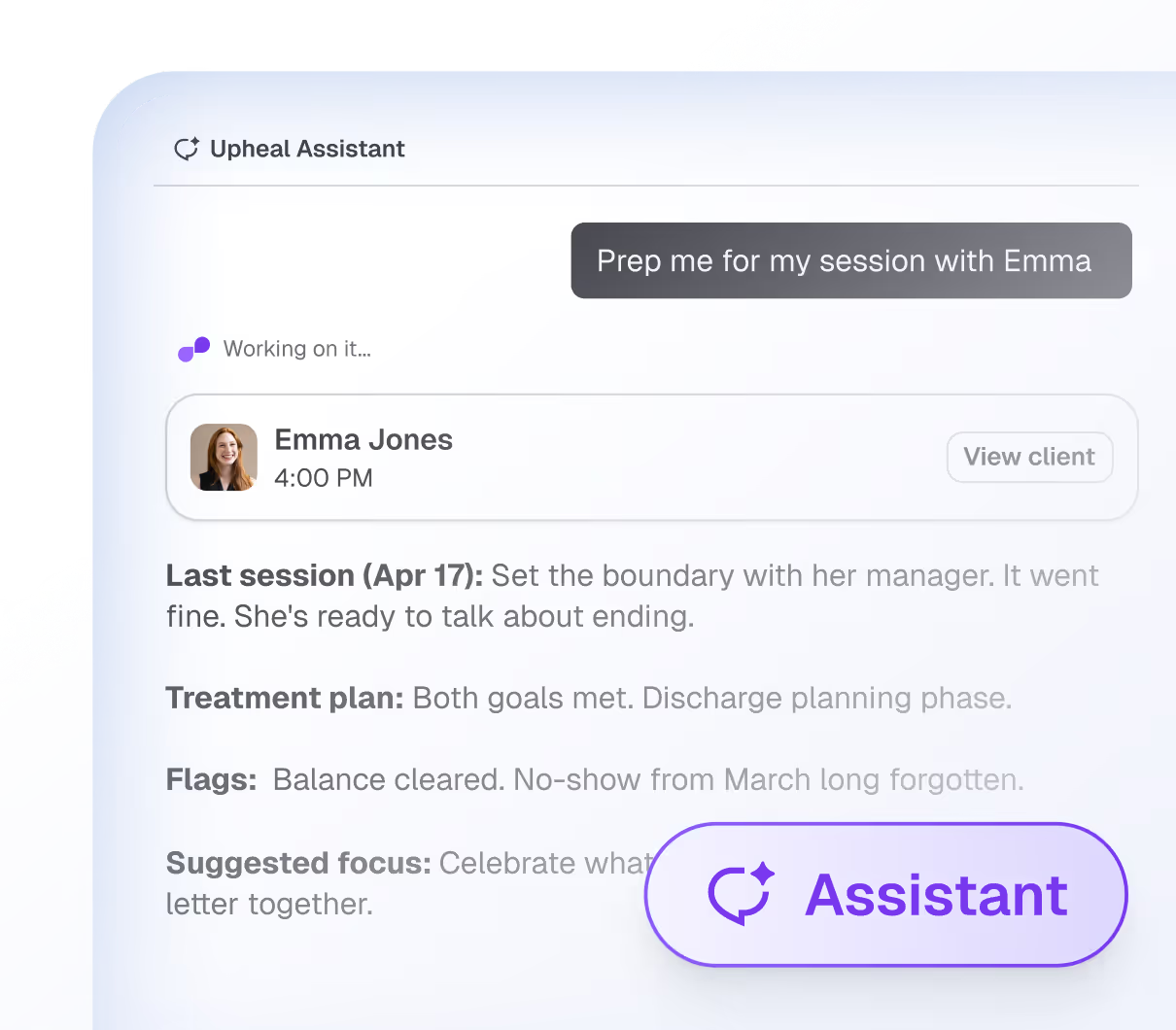
It works from your documents, not just your notes
Upload a psychological evaluation, a prior provider's summary or an ERA and the Assistant reads it and works from it. You can also give it Skills: reusable instructions for tasks you repeat, like a care summary in a specific format for a psychiatrist you co-manage with. Write the skill yourself or ask the Assistant to write it, and it picks the right one automatically. Blueprint has neither.
AI notes are free for good. On Blueprint, sessions are free for 30 days.
Blueprint's pricing page lists no free tier. New signups get 30 days of free sessions, and after that every session costs $0.99 alongside your EHR, or $1.49 with Blueprint as your EHR. Upheal's free plan includes unlimited AI notes and telehealth. If AI documentation is the reason you are reading this page, that is the difference that matters.
Secure messaging, in the app
Upheal includes secure in-app messaging with clients, and the Assistant drafts messages from the client's session notes, treatment plan and assessments: a check-in after a hard session, a reminder tied to a goal. Blueprint describes client communication as email and text, with clients reaching a portal through links sent by email or SMS. Whether email meets your standard for clinical communication is your call; the difference is that Upheal gives you a channel built for it.
The Compliance Checker
Upheal audits notes against Aetna and Optum payer standards before you sign. If a note is missing a required element or a medical necessity criterion, you find out before the claim goes out. Blueprint has no equivalent.
Forms and templates that build themselves
Drop a PDF of any existing form into Upheal and it becomes a structured digital form. Need a note template for a modality Upheal does not ship one for? Ask the Assistant to build it. Smart Sections let you write your own instruction for an individual section so the AI captures the same thing every time. Blueprint has customizable forms and templates, edited in settings, and publishes no PDF import or section-level instructions.
Editing versus regenerating
Tell Upheal's Assistant what to change in a note and it changes that one thing, leaving the rest of your wording alone. Blueprint's documentation page says a note that is missing something can be regenerated by telling the Assistant. Regenerating a note to fix one line is a different workflow from editing the line.
Run the practice from your phone
The Upheal Clinician app on iOS and Android records sessions, schedules, reschedules and cancels appointments, edits client details, sends secure messages and announcements, shows your calendar and runs the Assistant. Blueprint's clinician app is a session-capture and dictation app that feeds its AI notes. Its client app is the measurement-based-care check-in app.
35 languages
Upheal auto-detects and transcribes sessions in 35 languages, follows a session that moves between English and Spanish, and generates notes in 7 languages. Blueprint's help centre lists 34 languages it can transcribe, and its progress notes are generated in English whatever language the session was in.
You decide what happens to recordings
Upheal lets you keep session recordings for supervision or peer consultation, or auto-delete them. Blueprint deletes recordings after transcription, which is a sound default and also the only option.
Privacy: read both sets of terms
Both platforms are HIPAA compliant and have completed a SOC 2 Type II audit, and both state PHIPA compliance. Upheal is HIPAA, PHIPA, PIPEDA, GDPR, and DPA compliant, has completed a SOC 2 Type II audit, and is continuously externally tested. Blueprint's privacy and security page names HIPAA and PHIPA and says it runs on US-based infrastructure. Both use de-identified data to improve their own models. The difference is who decides.
On Upheal, no session data is used for AI improvement unless the client actively opts in. Clients who never see the request are opted out. Consent can be withdrawn and the data is deleted. Therapists on paid plans can switch the request off for every client. Where a client has opted in, Upheal keeps de-identified session data for a year after it was entered and derived datasets for five. All of that is set out in Upheal's privacy policy and support center.
Blueprint's marketing page says client data is "never used to train AI models." Its Platform Services Agreement, last updated January 30, 2026, is narrower: Blueprint will not use Clinic Data to train models outside the provision of its services, and de-identified data derived from Clinic Data is defined as not Clinic Data and may be used for the development of models used within the services. The agreement describes no opt-in and no opt-out, places all patient consent obligations on the clinic, and states that it supersedes the privacy policy where the two conflict. None of that is unusual for a software contract. It is different from what the marketing page says.
Assessment scores that explain themselves
Send a PHQ-9 or GAD-7 from the client's chart and their Insights tab fills in on its own. You get the current score and severity, the change since last time and since the first submission, and every submission plotted against severity zones. Then Upheal pairs the new score with the most recent session and explains what moved, scoped to the measure, so a GAD-7 insight talks about anxiety and a PHQ-9 insight talks about depression even when something like sleep shows up in both. Any score above zero on PHQ-9 item 9 triggers an email and a red banner straight away. You can thumbs-down any reading and flag what was off.
Blueprint began life as a measurement-based care platform and outcome tracking is genuinely core to what they do, so this is the one place on this page where they have the longer history. The difference is the interpretation: a score paired with what actually happened in the room, rather than a number and a line on a chart.
Switching is guided, by the Assistant or by a person
Moving a practice between systems is the part everyone dreads, and the fear of losing something is why plenty of therapists stay on software they have outgrown. On Upheal you export from your old EHR, drop the file in, and the Assistant does the rest: it reads the export, works out what is a client, a note, a form or a chart file, and rebuilds your practice inside Upheal while you watch. No spreadsheet surgery, no re-keying a caseload at the weekend. If you would rather have a person do it with you, a guided call is there for the asking, because this is the moment people want a human. Both are free, and so is the migration itself. Blueprint imports clients, notes, forms and billing during onboarding.
Pricing
Blueprint is $0.99 per session for its AI alongside your existing EHR, or $1.49 per session with Blueprint as your EHR, on prepaid credits that never expire, with no subscription or monthly minimum. The AI is the same at both prices; what changes is whether Blueprint holds the record it works from. At 40 sessions a month that is about $40 or $60. At 100 sessions, $99 or $149. With Blueprint as your EHR, claim submissions and eligibility checks are included at no additional cost, and card processing is waived until February 2027, then 3.15% plus $0.30 (Blueprint pricing checked 30 September 2026). Check the current position with each before deciding.
Upheal AI Notes is $39 a month alongside your existing EHR, and the Upheal EHR is $1 per session, billed after the sessions happen. AI notes, treatment plans, the Compliance Checker, scheduling, telehealth, billing, insurance claims and secure messaging are included. A practice seeing 30 clients a month pays $30. Running more than about 60 sessions a month? The $99 plan covers unlimited sessions and includes Assistant Pro.
Against the Upheal EHR at $1 per session, Blueprint at $0.99 is a cent cheaper per session and at $1.49 it is about 50% more. Against Upheal AI Notes at a flat $39 a month, Blueprint's $0.99 alongside your EHR costs more from 40 sessions a month (Blueprint pricing re-checked 30 September 2026). The more useful question is which assistant does the work you need done this month.
Which EHR is right for you?
Blueprint makes sense if you file a lot of insurance claims and want them included in a per-session price, if measurement-based care is central to how you practice, or if you want AI documentation and clinical chat and do not need the assistant to touch billing or client communication. Nothing on this page should talk a practice out of an EHR that works for it.
Upheal makes sense if you want the AI to do the billing, prep and admin as well as the notes, if AI notes need to be free, if secure in-app messaging matters to how you work with clients, if you need the Compliance Checker, or if you would rather pay one flat monthly price for AI notes than buy credits per session.
The choice comes down to one question: do you want an AI that answers, or an AI that does the work?
What therapists think about Upheal and Blueprint
Therapists who have used both tend to notice the same things.
"I really like how easy Upheal is to use and that it allows therapists to turn off opting in to training the LLM." - TS
"Between the four tools currently available to help private practice therapists streamline their documentation, AutoNotes, Blueprint, Mentalyc, and Upheal, Upheal comes out as the winner in terms of easing the burden of documentation and providing additional session insights that may be helpful for the therapist." - Hannah Weisman, PhD
"Upheal offers many features that other AI clinical note takers do not. The analytics set Upheal apart, the formatting of their notes with some customizability, and more. However, the feature that, to me, sets Upheal apart from other AI clinical note takers is how well it detects who is the client and who is the clinician." - Daniel Elliott
"As a graduate student and a care coordinator, I had the chance to test Upheal, and I am truly impressed. It makes documentation so much more efficient and captures key information during sessions, streamlining the process of note-taking." - Reem Alkaabi
Frequently asked questions: Upheal vs Blueprint
Is Blueprint an EHR?
Yes. Its all-in-one EHR covers scheduling, telehealth, client records, notes, forms, billing and insurance claims, at $1.49 per session with the AI included. The same AI also runs alongside an EHR you already have, at $0.99 per session. Their pricing FAQ states the AI is the same in both; the difference is where your practice runs. Verified against Blueprint's pricing page on 30 September 2026.
How does Blueprint's pricing compare to Upheal?
Both offer session-based pricing. Blueprint's AI is $0.99 per session alongside your existing EHR or $1.49 with Blueprint as the EHR, with no subscription or monthly minimum, on prepaid credits that never expire, and new signups get 30 days of free sessions. Upheal AI Notes is $39 a month alongside your existing EHR, and the Upheal EHR is $1 per session, billed after the fact. Blueprint at $0.99 is a cent cheaper per session than the Upheal EHR, and from 40 sessions a month Upheal AI Notes at $39 costs less than Blueprint alongside your EHR. Upheal's free plan includes unlimited AI notes and telehealth.
What can Upheal's AI Assistant do that Blueprint's can't?
Upheal's Assistant drafts appeal letters, generates invoices and superbills, tracks balances, runs background routines, reads uploaded documents, follows reusable Skills, and builds tables and charts you can download. Blueprint's own help centre states that their Assistant is not designed for billing, insurance or practice-level business questions, is not for interacting directly with clients, and does not act independently. The administrative tasks it documents are clearing or adjusting your schedule and moving or cancelling appointments. It does draft clinical letters and answer clinical questions from the client record.
How does Blueprint handle billing compared to Upheal?
Both platforms have live insurance billing with electronic claims, eligibility checks and ERA processing. Blueprint's is part of its all-in-one EHR at $1.49 per session, with claim submissions and eligibility checks included at no additional cost and card processing waived until February 2027, then 3.15% plus $0.30. The difference is the assistant: Upheal's can draft claim appeals and generate invoices, while Blueprint's help centre places billing and insurance questions outside its Assistant's scope.
Which platform is better for privacy?
Both are HIPAA compliant and have completed a SOC 2 Type II audit, both state PHIPA compliance, and both delete session audio after processing. Upheal is HIPAA, PHIPA, PIPEDA, GDPR, and DPA compliant, has completed a SOC 2 Type II audit, and is continuously externally tested. Blueprint's privacy and security page names HIPAA and PHIPA and says it runs on US-based infrastructure. Both use de-identified data to improve their own models. Upheal only does so from sessions where the client has actively opted in, consent can be withdrawn with deletion, and therapists on paid plans can switch the request off entirely. Blueprint's Platform Services Agreement permits use of de-identified data for model development within its services and describes no opt-in or opt-out.
Does Blueprint have secure client messaging?
Blueprint describes client communication as email and text, with clients reaching a portal through secure links. Its plan comparison page lists no secure in-app messaging feature. Upheal includes secure in-app messaging with AI drafts written from the client's record, available on the web and in the Upheal Clinician app.
Sources: Blueprint claims are taken from its pricing page and feature comparison, its help centre article on the AI Assistant, its Platform Services Agreement (last updated January 30, 2026), its privacy and security page and the App Store listings for its clinician and client apps. Pricing re-read 30 September 2026; feature and help centre pages read 7 September 2026; the services agreement read 4 September 2026; the privacy and security page re-read 15 September 2026. Where this page says Blueprint does not have something, that reflects its own published pages and documentation, and where its marketing and its help centre disagree we have said so and used the documentation. Upheal claims are taken from the Upheal support center, changelog and privacy and compliance page. Pricing and features change; confirm current terms with each vendor before deciding.