
Insurance billing is here: from signed note to paid claim
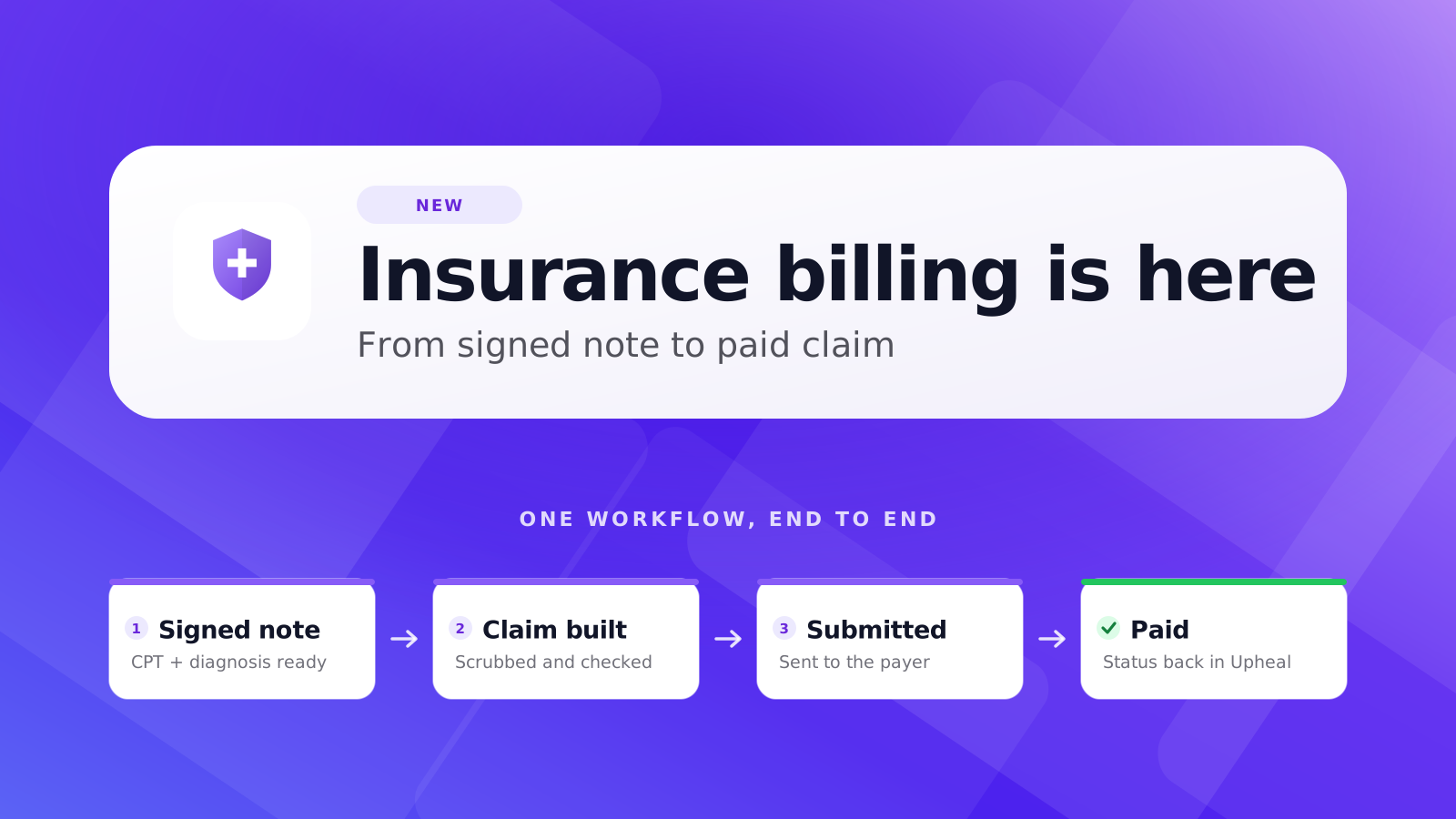
For the past month, my job has mostly been talking to therapists about insurance billing. Beta calls, diaries, support threads, waitlist notes. And one line kept showing up, almost word for word: "I’d switch everything to Upheal if you guys had insurance billing."
We heard you. As of today, insurance billing is live in Upheal for everyone.
It was the most upvoted item on our public roadmap, and it's the last big piece that kept insurance-based practices bouncing between Upheal and another platform. Eligibility checks, claims, ERAs, and denial appeals now live in the same place as your notes, scheduling, and payments.
And through October 1, all of it is free to use. No claim fees, no eligibility fees, while you get set up and put it through its paces.
What does Upheal's insurance billing include?
Insurance billing in Upheal covers the full loop from coverage check to posted payment:
- Eligibility checks run inside Upheal, with in depth coverage details including mental health specific benefits when the payer returns them. You don’t have to log into a payer portal — everything they send us, we show you.
- Electronic claims are created from your signed notes in one click, or batch created for every unbilled session at once. We’ll proactively flag any claim submission problems before it gets filed.
- Secondary insurance is supported. Clients with two plans won’t require two workflows or messy manual reconciliation.
- ERAs post themselves. When the payment report arrives, Upheal matches it to the right claim and recalculates what the client owes.
- Denied claims get an appeal drafted by Upheal Assistant, built from the client's chart and claim records to establish medical necessity and address the denial reason.
- A billing hub on every session shows client responsibility, expected insurance payment, and write off in real time.
You bill under your own NPI, with your own payer contracts and rates. There's no clearinghouse account to set up or manage; the integration is built into Upheal and fits cleanly with everything in your existing process.
What changes when we integrate billing into the Upheal EHR
In most practices, your EHR knows the session happened, your notes tool knows what you did, and your clearinghouse knows what you billed. When those are three different systems, you're the one carrying data between them.
Upheal is one system. So when you sign a note, everything a claim needs already exists: the client, the appointment, the CPT code, the diagnosis, the session details. The claim fills itself in from your billing profile, the session, and the client's insurance. Your job is to review and submit, not to type.
That same architecture is what makes the parts we're proudest of possible:
Rejections in plain language. If a payer or clearinghouse rejects a claim, you won't get a cryptic code and a shrug. You'll see what was rejected and why, right next to the session it belongs to, so you can fix it and resubmit.
Expected vs. paid, side by side. Because your contracted rates live in Upheal, every session shows what insurance should pay before the ERA ever arrives. When the payment posts, we show you the difference. That level of visibility means that you’ll never realize a year too late that you’ve been underpaid dozens of times.
Appeals drafted from the chart. This is the one no billing-only tool can do, because they don't have the chart. When a claim is denied, Upheal Assistant drafts the appeal for you, pulling the relevant clinical information from your documentation and the claim information from the denial. It's the same Assistant that already knows your clients, sessions, and claims, so what used to be an evening of digging through notes becomes a review and send.
And your notes themselves are part of the billing story. Denials usually start in documentation, not in billing. Upheal's Compliance Checker reviews notes against payer requirements before you sign, so the claim you submit is backed by a chart that holds up.
Or skip the clicking and just ask
Or maybe you’re like me, and billing is daunting no matter which way you slice it. Here's the part that’s really cool, because no other billing tool works this way: anything you can do in Upheal's billing interface, you can ask Upheal Assistant (beta) to do for you.
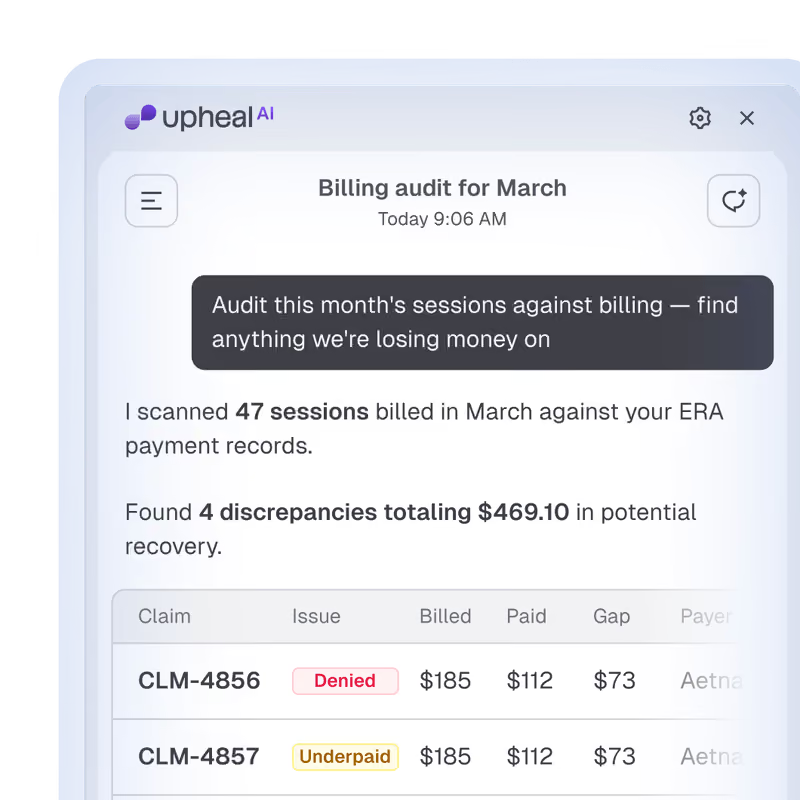
"Check eligibility for my new client before Thursday." "Create claims for last week's unbilled sessions." "Why was this claim rejected?" "Which claims need my attention this week?" Upheal Assistant has the context for your clients, your sessions, and your claims, so it can run the check, create the claims, explain the rejection in plain language, and draft the appeal. It can even walk you through setup, from your billing profile to payer enrollment, step by step.
This is how every feature in Upheal works, and billing is no exception. You can learn the interface, or you can just describe what you need. Most billing tools come with a learning curve and a lot of anxiety. This one comes with a colleague.
What we learned from beta testers
We ran a closed beta with dozens of practices over the past two months, alongside professional billers who helped us bake in payer rules and real world know-how into every flag and workflow.
The stories stuck with me. One clinician told us he's leaving his previous EHR because it never flagged claims that had stalled in "received" status for a full year, past the window to follow up or appeal. He lost a year of income from that client and only found out when it was too late to fix. That's exactly the failure mode we designed against: claim status is visible in Upheal, rejections come back with reasons, and nothing stalls silently next to a session that looks finished.
Beta testers also pushed us to make error messages clearer, surface more detail from payers, and smooth out setup for practices coming from platforms that handle billing very differently. A lot of that feedback has already been implemented, and we’re committed to continuing to improve the system until it’s seamless for every practice and workflow.
How to get started with insurance billing in Upheal
- Create your billing profile. Add your practice details, NPI, and contracted rates. Work in more than one way, like multiple locations or separate practices? Create as many profiles as you need.
- Enroll your payers. Choose what runs through Upheal for each payer: electronic claims, eligibility checks, ERAs, or all three. Enrollment for most payers completes within a day or two.
- Sign your note, create your claim. One click per claim, or batch create for every unbilled session.
- Let payments match themselves. When the ERA arrives, Upheal reconciles it and updates what the client owes.
One note: today, you'll need to be credentialed with your payers already (or billing out of network). Credentialing as a service is coming soon, along with Managed Billing for practices that want the whole thing handled for them. Join the waitlist to be first in line when they open up.
You can add each client's primary and secondary insurance to their profile, collect release of information and assignment of benefits through Upheal's practice forms, and let clients snap and upload their insurance cards. No more "can you email me a photo of the back, too?"
Everything you need to set up is on the insurance billing feature page, or just ask the Assistant to walk you through it.
Try Upheal free and set up billing in your first session.
How much does Upheal insurance billing cost?
Upheal itself stays $1 per session, capped at $69 per month, with everything included: notes, scheduling, telehealth, forms, payments, and Upheal Assistant (beta). Insurance billing adds simple usage based fees on top: $0.30 per claim submission and $0.15 per eligibility check. No monthly billing fee, no setup cost, and no minimums. Legacy EHRs charge a monthly billing fee whether you bill or not; with Upheal, you pay only when you bill.
And until October 1, the billing fees are waived entirely. Every claim and every eligibility check is free while you get set up, migrate your clients, and see how it fits your practice.
What's coming next
We're releasing the next wave over the coming weeks, shaped directly by beta feedback:
- Multiple sessions on one claim for batch submissions
- Billing automations, like claims and invoices that create themselves and update automatically from ERAs
- Prior authorization management and insurance policy tracking
- Smarter denial prevention, learning from payer specific patterns so issues get flagged before you submit, not after
- Credentialing and Managed Billing, standalone services for practices that want payer enrollment or the entire billing operation handled for them
If something on this list matters to your practice, tell us. The public roadmap is where this feature came from, and it's where the next ones are taking shape.
One platform, finally
Notes, scheduling, telehealth, payments, and now insurance billing. Your notes already do the hard part. Let them bill, too.
Start free, no credit card required
Frequently asked questions
Do I need a clearinghouse account for insurance billing?
No. Connectivity is built directly into Upheal, so there's no separate clearinghouse account to set up or manage. You still bill under your own NPI, with your own payer contracts and rates, and the integration fits cleanly into your existing process.
How much does insurance billing cost?
It's $0.30 per claim submission and $0.15 per eligibility check, with no monthly billing fee. There are no setup costs or minimums either, and every claim and eligibility check is free through October 1 while you get set up.
Do I need to be credentialed with payers to use it?
Yes, for now you'll need to already be credentialed with your payers, or be billing out of network. Credentialing as a service is coming soon, alongside Managed Billing for practices that want the whole process handled for them.
Can I bill secondary insurance through Upheal?
Yes. Clients with two plans don't require two separate workflows or manual reconciliation between them.
What happens if a claim gets denied?
The Upheal Assistant drafts the appeal for you. It pulls the relevant clinical information from the chart and the denial reason from the claim, so what used to be an evening of digging through notes becomes a quick review and send.
How long does payer enrollment take?
Enrollment for most payers completes within a day or two. For each payer, you choose what runs through Upheal, whether that's electronic claims, eligibility checks, ERAs, or all three.

.avif)

