Best scheduling software for therapists

Scheduling software affects more than just your calendar. It touches every part of your practice: how clients book appointments, how you manage your time, whether you can actually leave work at a reasonable hour.
The challenge is figuring out which platform will actually work for your specific practice without creating new headaches. HIPAA compliance is non-negotiable, but beyond that, your needs depend entirely on your practice structure, client population, and how you work.
This guide covers what therapy scheduling software needs to do, examines eight scheduling approaches used by mental health professionals, and gives you a way to test a platform before you commit.
What therapy scheduling software needs to do
Most scheduling software is built for dentists and physicians. Therapy is different: clients often book during a hard week, insurance adds a layer of verification most other appointments don't need, and back-to-back sessions drain you in a way a run of 15-minute check-ups doesn't. Before comparing platforms, here is what matters.
Client self-scheduling with boundaries built in. Clients should be able to book, reschedule, and cancel without calling you. The platform should let you set buffer time between sessions, cancellation windows, hard stops around lunch and end of day, and limits on how many new-client slots are open in a week. Self-scheduling without those controls optimises for a full calendar, not a sustainable one.
Two-way calendar sync. Most EHRs push appointments out to Google Calendar but never read anything back, so a dentist appointment you add to Google looks like open time to a client. True two-way sync treats every calendar you connect, including insurance-platform calendars like Alma or Headway, as one picture of your real availability. Here is why one-way sync causes most double-bookings.
Eligibility checks before the session, not after. Verifying insurance after someone is already booked is the wrong moment to discover they aren't covered. Look for an eligibility check that runs at booking or intake, shows the client's copay and mental health benefits, and makes it simple to switch to private pay when coverage fails.
Crisis-aware booking. Your clients aren't booking haircuts. Keep the booking flow short, ask for the minimum at first contact, make urgent slots findable, and save the long intake forms for after confirmation. Anything that could overwhelm someone in a bad moment belongs later in the process.
Waitlist automation. When a client cancels at 8:45am, the platform should be able to offer that slot to the right waitlisted client, with a booking link, without you doing the matching by hand.
Reminders, telehealth, and payments in the same place. Automated reminders measurably cut no-shows. Telehealth links that come from the calendar entry remove a step. A payment step tied to the session means the invoice goes out when the session ends. Each of these is a separate tool if your scheduler doesn't include them.
Standalone scheduling or full practice management?
A standalone scheduler can make sense if you see fewer than about 25 clients a week, already have documentation and billing you like, and want to spend $20 to $50 a month rather than $80 to $150. Above that caseload, or if you're already juggling three tools, an integrated platform that puts scheduling next to notes, billing, and telehealth usually pays for itself in admin time. Whatever you choose, it needs to connect to your calendar app, your telehealth platform, your payment processor, and client email or SMS.
Comparing scheduling platforms
Therapy scheduling software falls into two categories:
- comprehensive practice management systems that bundle scheduling with clinical documentation and billing
- dedicated scheduling tools that do one thing well, calendaring
Neither approach is inherently better. Your choice depends on whether you want an integrated system or prefer specialized tools that work together.
| Platform | Monthly Cost | Common Integrations | Client Self-Scheduling | Mobile Access |
|---|---|---|---|---|
| SimplePractice | $49–$99, AI notes $35 extra | Native ecosystem | ✅ Full portal | ✅ Dedicated apps |
| Upheal AI Notes | $39/mo, alongside your current EHR | Works alongside any EHR | Stays in your EHR | ✅ Native mobile apps |
| Upheal EHR | $1/session, free plan available | Alma, Headway, Rula, Grow, others | ✅ Client portal app | ✅ Native mobile apps |
| TherapyNotes | $69 solo, $79 + $50/clinician; AI $40 | Billing/EHR focused | ⚠️ Manual approval | ❌ Web responsive |
| TheraNest (Ensora Health) | $29–$89, Ensai scribe $35 extra | Wiley Planner, included on Premier | ✅ Client portal; booking from Advanced | ✅ iOS and Android apps |
| Jane | USD $54–$99, AI Scribe $15 extra | Jane Payments, Claim.MD | ✅ Portal; auto-waitlist on Thrive | ❌ Patient app only |
| CounSol.com | $49.95–$69.95 + $35–$45/user | Custom integrations | ✅ Branded portal | ❌ Browser only |
| Acuity Scheduling | $49 Premium required | Zoom, payment systems | ✅ Robust booking | ✅ Full mobile apps |
| A paper calendar | $0-$20 | Your memory | ❌ via discussion | ✅ Always works |
SimplePractice, TherapyNotes and Upheal pricing verified 3 September 2026. Jane pricing re-checked 30 September 2026 against jane.app/pricing; other Jane details and TheraNest verified 4 September 2026 against jane.app and ensorahealth.com; TheraNest's HITRUST e1 certification verified 15 September 2026 against Ensora's own announcement. CounSol and Acuity figures come from third-party sources rather than vendor pricing pages and should be confirmed with the vendor before you budget.
About Calendly: It cannot legally be used for patient scheduling due to HIPAA non-compliance. Any scheduling software handling protected health information requires Business Associate Agreements and healthcare-grade security.
SimplePractice
SimplePractice serves over 225,000 practitioners with integrated practice management combining scheduling, documentation, billing, and telehealth.
The platform represents the current standard for comprehensive therapy practice software, particularly for clinicians who want everything in one place.
When SimplePractice works well
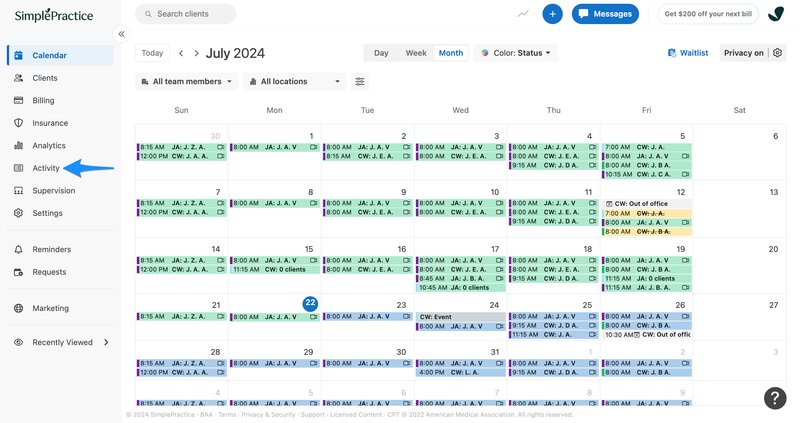
SimplePractice excels when you need modern functionality without managing multiple systems. The scheduling includes automated reminders, client self-service portals, and calendar synchronization that actually works reliably.
The interface design prioritizes user experience. Clients can book, reschedule, and complete intake forms through an intuitive portal. Therapists manage appointments through drag-and-drop interfaces that handle complex scenarios like recurring appointments and multi-provider coordination.
Their AI Note Taker generates session summaries and treatment plans directly from therapy sessions. This represents genuine innovation in clinical documentation, though understandably raises privacy questions worth considering carefully.
SimplePractice's limitations
Cost and complexity can overwhelm solo practitioners. Monthly expenses range $49-$99 before adding AI features at $35/month per clinician. This makes SimplePractice one of the more expensive options.
The breadth of features requires significant setup time. Some practitioners report that the comprehensive system makes simple scheduling tasks unnecessarily complex, particularly when transitioning from simpler methods.
The platform works best when you'll use most of its features. If you primarily need scheduling, paying for unused billing and documentation tools may not make financial sense.
Upheal
Upheal combines AI-powered clinical documentation with modern scheduling capabilities, representing next-generation software that understands therapy.
With over 70,000 therapists trusting Upheal today, we're building together with clinicians to help reduce administrative tasks and improve your workflow.

When Upheal works well
Upheal's AI capabilities transform scheduling from administrative tool into clinical intelligence platform. Automated progress notes, treatment plan generation, and session analytics with emotional tracking provide insights traditional systems cannot offer.
Integrated video conferencing with HIPAA-compliant recording enables seamless telehealth delivery while AI transcription captures session content for automated documentation. This reduces administrative overhead typically associated with therapy scheduling.
Two-way Google Calendar sync checks every connected calendar, including insurance-platform calendars, for conflicts before confirming a booking, whether the booking comes from a client or from you. Eligibility checks run before the session rather than after, so you know a client's coverage and copay before they walk in.
Pricing runs from a free plan to the EHR plan at $1 per session, so a 50-session month is $50 and a quieter month costs less. There is no seat fee, which matters if you are comparing against per-clinician pricing. Growing integrations with platforms like Alma and Headway streamline existing workflows.
Upheal's evolving capabilities
Client self-scheduling runs through the Upheal client portal: clients book, intake forms go out, and reminders follow, with no back-and-forth. Insurance billing and client messaging are part of the platform too. The AI Assistant answers questions about any client in plain language on its free tier; Assistant Pro, $39 a month or included in the $99 plan, goes further and handles scheduling changes and admin on your behalf.
As a newer platform, some features are still maturing compared to solutions with years of refinement. We're transparent about that, and early adopters help shape features that serve clinical needs rather than checking software boxes.
TherapyNotes
TherapyNotes specializes exclusively in behavioral health, serving over 60,000 mental health professionals with scheduling designed specifically for therapy workflows.
The platform prioritizes clinical functionality over modern aesthetics, focusing on features that directly support therapeutic practice.

When TherapyNotes works well
TherapyNotes understands therapy-specific scheduling challenges. Their Quick History Review provides instant access to previous session data during scheduling, enabling informed decisions about session frequency and treatment planning.
The platform handles structured clinical workflows effectively, with specialized templates for different therapeutic modalities. Multi-location support manages complex practice arrangements, while integrated billing connects scheduling directly to insurance processing.
For practices prioritizing clinical workflow efficiency over interface design, TherapyNotes delivers functionality that matters.
TherapyNotes' limitations
Limited mobile functionality represents a significant constraint. TherapyNotes lacks dedicated mobile applications, offering only mobile-responsive web interfaces that compromise efficiency when working outside traditional office settings.
Client self-scheduling requires manual approval, creating administrative steps that automated systems eliminate. This particularly affects practices serving tech-comfortable clients who expect immediate booking confirmation.
The interface reflects older development approaches. While functionally effective, the design feels dated compared to contemporary platforms emphasizing modern user experience.
TheraNest by Ensora Health
TheraNest, now part of Ensora Health, has been a behavioral health EHR for over a decade, covering scheduling, documentation, billing and telehealth for mental health practices.
Pricing is per therapist across three tiers: Essentials $29, Advanced $59 and Premier $89 a month, or $27, $54 and $82 on annual billing. Verified against Ensora's pricing page on 4 September 2026.

When TheraNest works well
The entry price is genuinely low. Essentials at $29 per therapist covers scheduling, the client portal, calendar sync and basic notes, which is enough for a self-pay solo practice. Telehealth is a $12 per therapist add-on at that tier and included from Advanced up.
Administrative and billing staff are free on every plan, so a practice carrying a heavy admin-to-clinician ratio only pays for the people who actually take bookings. Clinician seats themselves are priced per therapist.
The AI has shipped and it is reasonably priced. Ensai notes enhancement, which polishes a note you have already written, is included on all three tiers. The Ensai Session Assistant records the session, drafts the note, and produces AI Case Summaries of a client's history, at $35 per provider per month. Premier also includes the Wiley Treatment Planner, which is a $25 per therapist add-on on Advanced.
Security goes past HIPAA. TheraNest holds HITRUST e1 certification, which Ensora announced in June 2025. Upheal is SOC 2 Type II audited but does not hold HITRUST, so if HITRUST is a hard requirement for your practice, TheraNest meets it and Upheal does not.
TheraNest's limitations
The ambient AI is never bundled. The Ensai Session Assistant is a per-provider add-on stacked on top of a per-therapist plan, including on the $89 Premier tier, so a fully AI-documented setup runs $64 at the bottom and $124 at the top. For a four-clinician practice on Premier with Ensai, that is $496 a month.
Essentials is thinner than the price suggests. Custom intake forms, online booking, secure messaging and claims processing all start at Advanced, and insurance billing automation is Premier only.
There is also a $19.50 annual AMA CPT licence fee per therapist, and no free plan, only a 21-day trial of Premier.
Jane
Jane is a practice management platform used across allied health disciplines, from physiotherapy and chiropractic to mental health, with unusually generous support and no long-term contract.
For therapists it sits in an interesting spot: broader than a therapy-only EHR, and priced per practitioner rather than per location once you move past the entry tier.

When Jane works well
Jane's interdisciplinary design handles scheduling that spans multiple service types, provider specialties, and billing structures, which is why multi-modality clinics tend to like it. A waitlist and waitlist notifications come with every plan, while automated waitlist management, patient self check-in, and room and equipment booking arrive on the top Thrive tier. Jane publishes 99.9% uptime and holds HIPAA, PIPEDA, and GDPR compliance alongside a SOC 2 audit.
Support is a genuine differentiator. Chat, email, and phone support are unlimited with no time limits, data import and migration are free, and every account includes a complimentary setup consultation. Clinics with ten or more licenses get dedicated onboarding on top of that.
Pricing is published openly in USD: Balance at $54 a month for one practitioner and up to 20 appointments, Practice at $79, and Thrive at $99, with per-practitioner fees on the two higher tiers. Add-ons are priced separately, including AI Scribe at $15 per opted-in practitioner for unlimited notes, group telehealth at $15, and insurance billing at $20. Every plan includes treatment plans, custom charting templates, outcome measure surveys, intake forms, and five free AI Scribe notes a month.
Jane's limitations
The entry plan is tight. Balance caps you at 20 appointments a month and a single practitioner profile, so most working therapists start at Practice or above. Custom booking-site branding and SMS reminders only appear from Practice up, and SMS availability varies by region.
Jane's mobile app is patient-facing. Practitioners work in the browser, which can compromise efficiency for therapists moving between locations or delivering community-based services.
Insurance billing is a paid add-on rather than a core feature, and it applies to your whole account rather than the individual clinicians who need it, so the cost scales with your total license count. There is also no free trial. You can book a demo or explore a shared demo account, but you cannot run your own practice through Jane before you start paying.
CounSol.com
CounSol.com provides comprehensive practice management with extensive customization and dedicated account managers. Users report pricing stability since 2014, offering remarkable cost predictability in an industry known for annual increases.

When CounSol.com works well
White-glove onboarding includes dedicated account managers who understand individual practice workflows and configure scheduling specifically for your operational requirements. This personalized approach eliminates generic implementation challenges.
Unlimited custom forms and complete branding control enable practices to maintain professional identity throughout client scheduling experiences. Complex workflow configurations support specialized therapeutic approaches that generic platforms cannot accommodate.
24/7 support with established personal relationships provides immediate assistance during scheduling emergencies, distinguishing CounSol.com from platforms offering only ticket-based service.
CounSol.com's limitations
Interface design reflects early web development aesthetics. While functionally complete, the visual presentation feels outdated compared to contemporary platforms emphasizing modern user experience.
No dedicated mobile applications limit scheduling flexibility for therapists working outside traditional office environments. Mobile browser functionality provides basic access but lacks optimized experience.
Per-user costs, reported at $35 to $45 monthly for each additional counselor, make CounSol.com expensive for larger practices compared to unlimited-user pricing models. CounSol does not publish its rates on an open pricing page, so treat the tiers above as indicative and confirm current pricing with them directly.
Acuity Scheduling
Acuity Scheduling represents the only pure scheduling tool legally suitable for therapists, requiring their Premium plan ($49/month) for essential HIPAA compliance and Business Associate Agreements.
This platform focuses exclusively on appointment management without clinical documentation features.

When Acuity Scheduling works well
Acuity's specialized scheduling capabilities exceed most comprehensive platforms in appointment management sophistication. Unlimited appointment types, advanced waitlist algorithms, and comprehensive client self-scheduling create exceptional booking experiences without clinical system complexity.
Strong integration ecosystem connects with existing clinical documentation systems, payment processors, and video conferencing platforms, enabling customized technology stacks around robust scheduling foundations.
Cost efficiency appeals to solo practitioners wanting professional scheduling without comprehensive practice management expenses. When combined with separate clinical systems, total costs often equal integrated platforms while maintaining specialized tool advantages.
Acuity Scheduling's limitations
No clinical documentation features require separate systems for treatment notes, progress tracking, and insurance billing. This creates workflow fragmentation that integrated platforms eliminate.
Higher learning curve compared to therapy-specific platforms designed with clinical workflows in mind. General business focus requires adapting features designed for broader service industries rather than healthcare-specific requirements.
Limited healthcare integrations compared to specialized therapy platforms may complicate connections with EHR systems, insurance verification services, and clinical assessment tools.
Paper calendar
Many experienced therapists still rely on paper calendars. No login issues, no subscription fees, no software updates breaking workflows. Just reliable, immediate access to schedules without digital complications.
When paper calendars work well
Paper calendars never crash, never require updates, and always work exactly as expected. For therapists who've experienced scheduling software malfunctions during busy clinic days, pen and paper offers genuine peace of mind.
Zero monthly costs make paper economically attractive, especially for solo practitioners managing tight budgets. No HIPAA compliance concerns about cloud storage or data breaches, since schedules live safely in office filing cabinets.
The tactile experience of writing appointments helps some clinicians remember schedules better than digital interfaces. Color coding, sticky notes, and margin annotations provide customization rivaling sophisticated software.
Paper calendar limitations
Manual processes create significant administrative burden as practices grow beyond solo size. Double-booking becomes constant risk without automated conflict detection, while client communication requires separate systems for reminders and confirmations.
No client self-scheduling capability means every appointment requires phone coordination, limiting practice accessibility for clients preferring booking outside business hours. Telehealth integration is nonexistent, requiring separate coordination for remote sessions.
Backup plans consist of photocopying pages or manually entering appointments into digital formats. This complicates calendar recovery after coffee spills. Integration with billing systems, insurance verification, or treatment planning requires manual transcription between paper and digital systems.
Scheduling policies the software should enforce for you
Scheduling is a clinical decision as much as an administrative one. Your energy at 9am and at 4pm is different, and a calendar that ignores that shows up in your work. The best platforms let you encode the policies below once and then hold the line for you.
Buffers and clustering. Some therapists do best with blocks of four or five consecutive sessions and a long break; others need fifteen minutes between every client. Decide which you are and set it as a rule, not an intention. Block admin time for notes and treatment planning the same way, rather than squeezing it into gaps.
A cancellation policy that doesn't backfire. The standard 24-hour rule encourages clients to cancel early "just in case" and rarely protects income, since few solo practices have a waitlist ready to fill a next-day slot. Alternatives that work: a three-strike allowance before fees apply, or waiving the fee when the client reschedules within the same week. Whichever you choose, state it at intake and have the platform apply it consistently.
An ethical waitlist. Screen briefly for crisis before placing anyone on a waitlist, give honest wait times ("I typically have openings in six to eight weeks"), offer interim referrals and crisis resources, and check in every few weeks. A spreadsheet waitlist creates missed openings; an EHR waitlist can offer the slot automatically.
Crisis boundaries. You are not a crisis line, and a clear after-hours protocol protects both you and your clients. Business hours, how to reach you between sessions, and where to go in an emergency belong in the informed consent and in the client portal, not in a text at 11pm.
How to test a scheduling platform before you commit
Every platform demos well. Run these four scenarios in the trial instead:
- The crisis booking test: Have a friend book an urgent slot on their phone while stressed. Is the flow calming or overwhelming?
- The insurance test: Book a client whose plan won't cover the session. How fast can you see that and switch them to private pay?
- The no-show test: Mark someone absent and offer the slot to your waitlist. How many clicks?
- The boundary test: Try to book two sessions back to back, or through your lunch break. Does the system stop you?
Red flags: setup that takes more than a couple of hours to get basic booking running, no signed BAA, a mobile booking experience that feels like an afterthought, and support that's a chatbot when your calendar breaks at 7pm before a full day.
Roll it out in phases. Week one, self-booking and confirmations. Week two, buffers, blocked admin time, and a basic waitlist. From month two, eligibility checks and reporting. Even simple systems need a few hours of configuration; block that time or the project stalls.
Your scheduling choice impacts daily workflow
The scheduling platform you choose influences your practice's operational efficiency for years. This decision affects client satisfaction, revenue optimization, compliance requirements, and your professional quality of life more than most therapists initially realize.
The right scheduling software should eliminate administrative friction, not create new complexity requiring constant management. Professional therapy scheduling must handle HIPAA compliance, clinical workflows, and client communication standards that general business platforms simply cannot support.
Start by understanding your specific scheduling requirements before evaluating platforms. Your future self, and your clients, will appreciate the strategic approach to selecting scheduling software that genuinely serves your therapeutic mission rather than complicating it.
Centralize your calendars and
notes for free with Upheal.
Upheal's Free plan allows you to look at all your sessions and notes in one intelligent platform.