
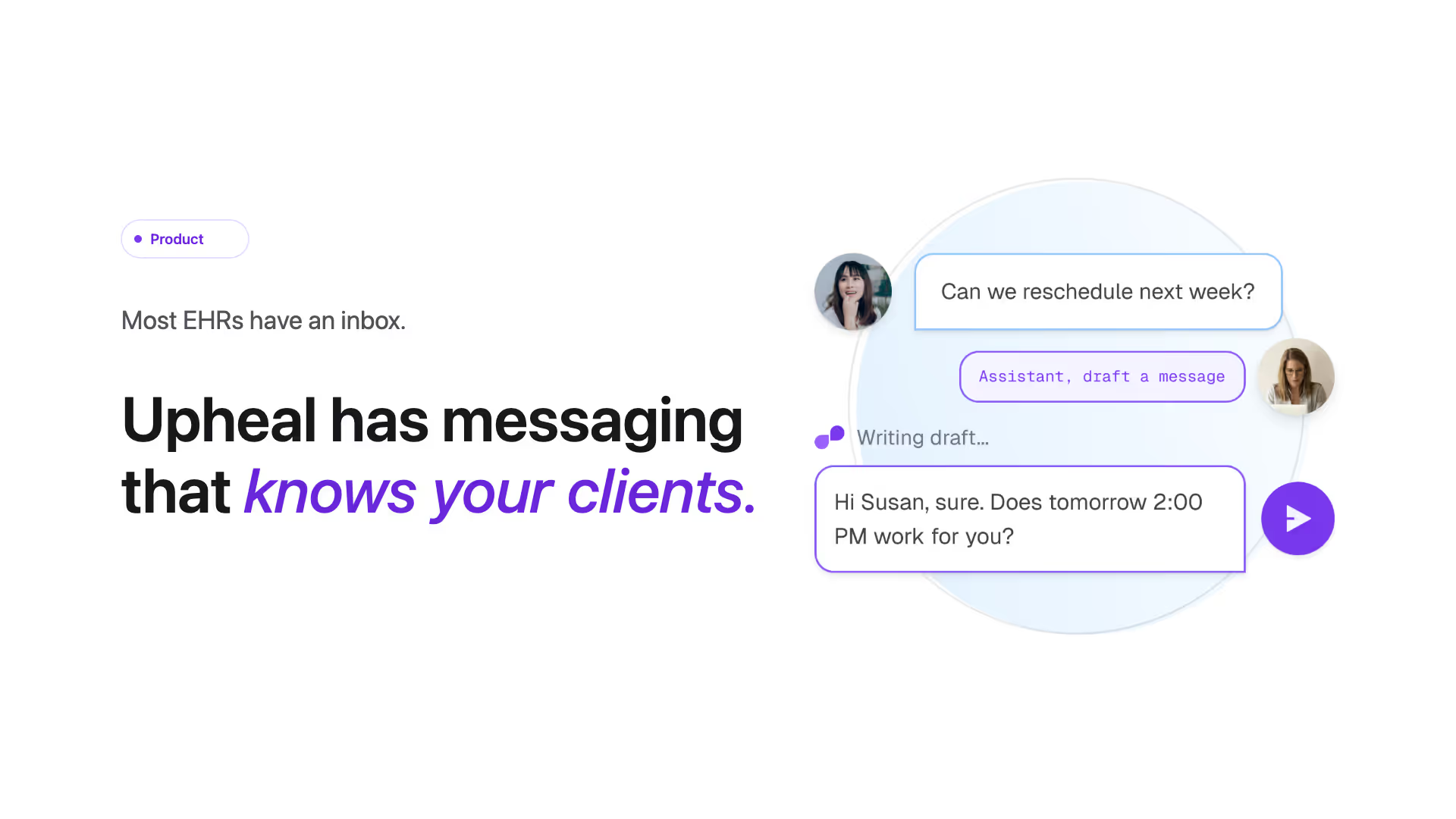
Most EHRs have an inbox. Upheal has messaging that knows your clients.
Why we built this now
Therapists are drowning in the spaces between sessions. Every solo practitioner we have talked to in the last six months tells some version of the same story: client emails pile up overnight, reminders get missed, policy updates get sent one by one across three tools, and the "real work" of being present with a client starts to feel crowded out by everything that surrounds it. As one therapist put it to us recently: "I'm spending more time managing my clients than actually working with them."
Client messaging itself is not a new feature. Every major EHR has shipped some version of "secure chat" by now. The category has converged on a remarkably narrow definition of the surface: a HIPAA portal you log into, a thread per client, and not much else. It works on paper. In practice, therapists end up back in email anyway, because a basic inbox tucked inside an EHR does not actually save anyone time.
We wanted to build something that earns its place in the workflow, not just the feature list. So we asked a different question: what would client communication look like if it actually used the clinical context your AI Assistant already has?
That is what shipped today.
What is Upheal Messaging?
Upheal Messaging is secure 1:1 client communication and bulk announcements with one defining difference: your Upheal Assistant can draft any client message you need to send, using your real session notes, treatment plan goals, and assessments on file.
There are three things in the launch:
- Secure 1:1 messaging. HIPAA-compliant chat with every client, organized by conversation, with read receipts and notifications. You see when a client opens your message. They see when you reply.
- Announcements (bulk messages). Send one message to your entire caseload, or to a selected group, in one click. Holiday closures, rate changes, policy updates, and group-wide practice news, without copying and pasting across thirty threads.
- Assistant-drafted messages. Ask Upheal Assistant to draft any client message: a reply to a question, a follow-up about homework, or any new message you need to send. It pulls from your last session, treatment plan goals, and assessments. You review, edit the tone if you want, and send. It never sends without your approval.
Messaging is off by default. You turn it on in Settings → Portal and Messaging, and you can enable or disable it per client. Clients receive everything through the Upheal client portal app, available natively on iOS and Android with push notifications.
Why basic EHR messaging is no longer enough
The therapy software market is consolidating around the therapist, not around the inbox. Three things changed in the last 18 months, and together they make standalone "secure chat" look obsolete.
Therapists are tired of paying for five tools. Sixteen out of the last twenty-five customer conversations we ran flagged multi-tool fatigue as a top reason for switching. One therapist said it plainly: "I'm really trying to get something more all-in-one." A separate messaging app, a separate scheduling tool, a separate notes tool, a separate broadcast email tool: that stack used to be unavoidable. It is not anymore.
Clients live on their phones. The majority of EHR client portals are still web-only. That means a client has to remember a URL, log in, and check a tab to see a message from their therapist. It also means push notifications, the only delivery channel that actually works for between-session communication, are not available. Without a real client app, "secure messaging" is landlocked to portal logins. Adoption stays low and therapists default back to email.
AI is already inside the practice workflow. Therapists using Upheal already have an Assistant that reads sessions, drafts AI clinical notes, writes referral letters and discharge summaries, surfaces treatment goals, and references prior assessments. The leap from "Assistant handles my documentation" to "Assistant can also draft a thoughtful message to that client about their homework" is small. The leap to a generic chatbot writing messages with no clinical grounding is enormous. The grounding is the entire point.
These three forces together are what make this the right moment for client messaging to grow up.
What makes Upheal's secure messaging different
The wedge is that your AI Assistant has read everything in the client record. Most other EHR messaging surfaces are detached from the clinical record. You write a message by hand, in a chat window, with no help. Upheal Messaging works differently, in three concrete ways.
1. Assistant-drafted messages grounded in your real clinical record
When you need to write a client a message, whether you are replying to one of theirs or starting a new conversation about homework or scheduling, you can ask the Upheal Assistant to draft it for you. It does not invent context. It reads:
- Your most recent session note (what you actually talked about last week)
- The client's current treatment plan and goals
- Any assessments on file (PHQ-9, GAD-7, intake forms, custom assessments)
- Your prior messages with this client
Then it produces a draft. You read it. You edit it. You can tell Assistant to make it warmer, shorter, more formal, or more clinical. When you are ready, you send it. The whole flow takes a fraction of the time of writing a message from scratch, and the output is more clinically anchored than what most therapists would have time to write at 9pm between sessions.
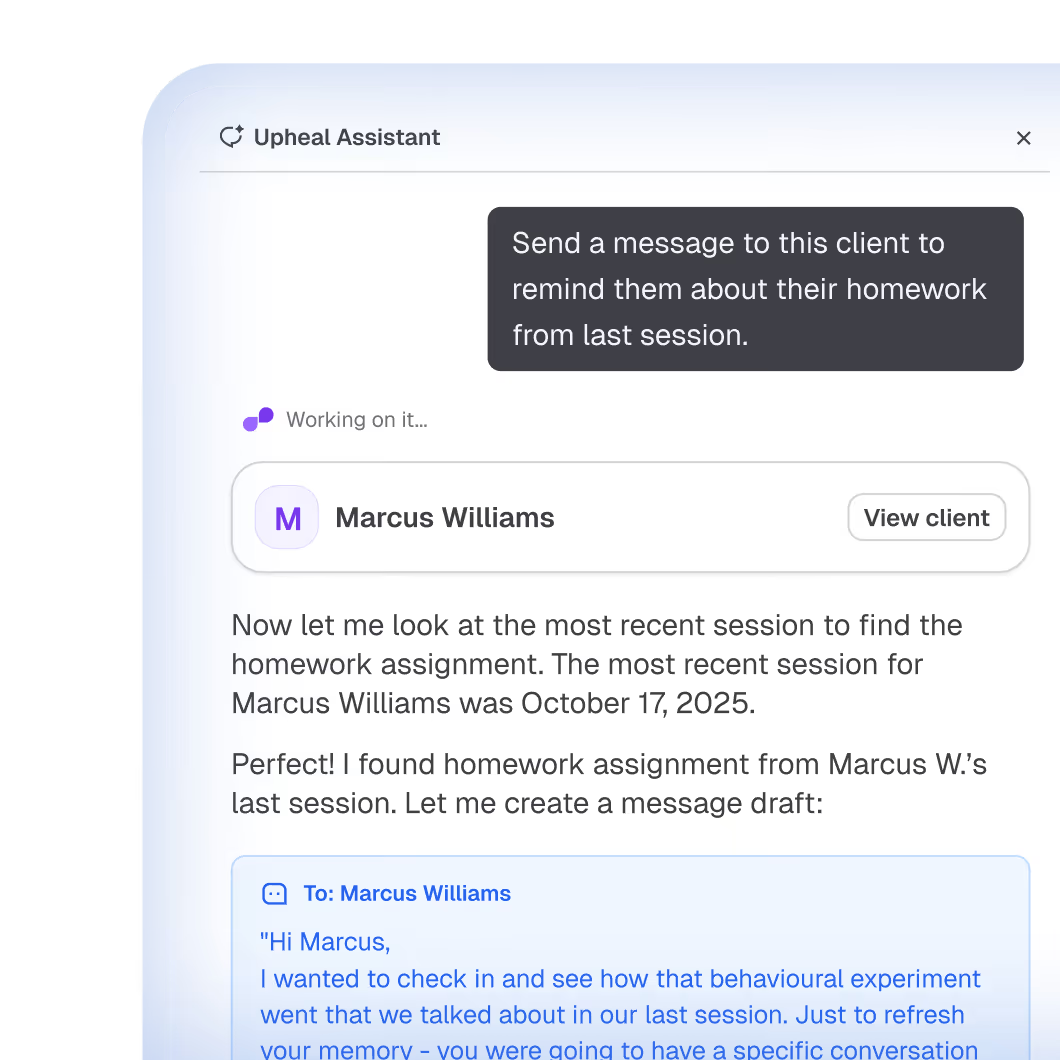
It never sends without your approval today. There is no auto-reply mode yet, though we see a future where that makes sense for some low-risk use cases (for example, answering payment-related questions for prospective clients before they book). For now: the Assistant proposes. You decide.
If you haven’t used Upheal Assistant yet, messaging is a good place to start. See how Upheal Assistant works across your practice, from session notes to scheduling requests.
2. Announcements that reach every client at once
A solo therapist has, on average, twenty to forty active clients. A group practice has hundreds. Sending the same message to every one of them, when something changes, is the most repetitive piece of administrative work in the practice. Closing for vacation. Rate changes. New office address. Holiday hours. Telehealth platform change. A new consent form. Each one of these requires you to copy and paste the same message into thirty conversations, or to send a mass email and hope it does not land in spam.
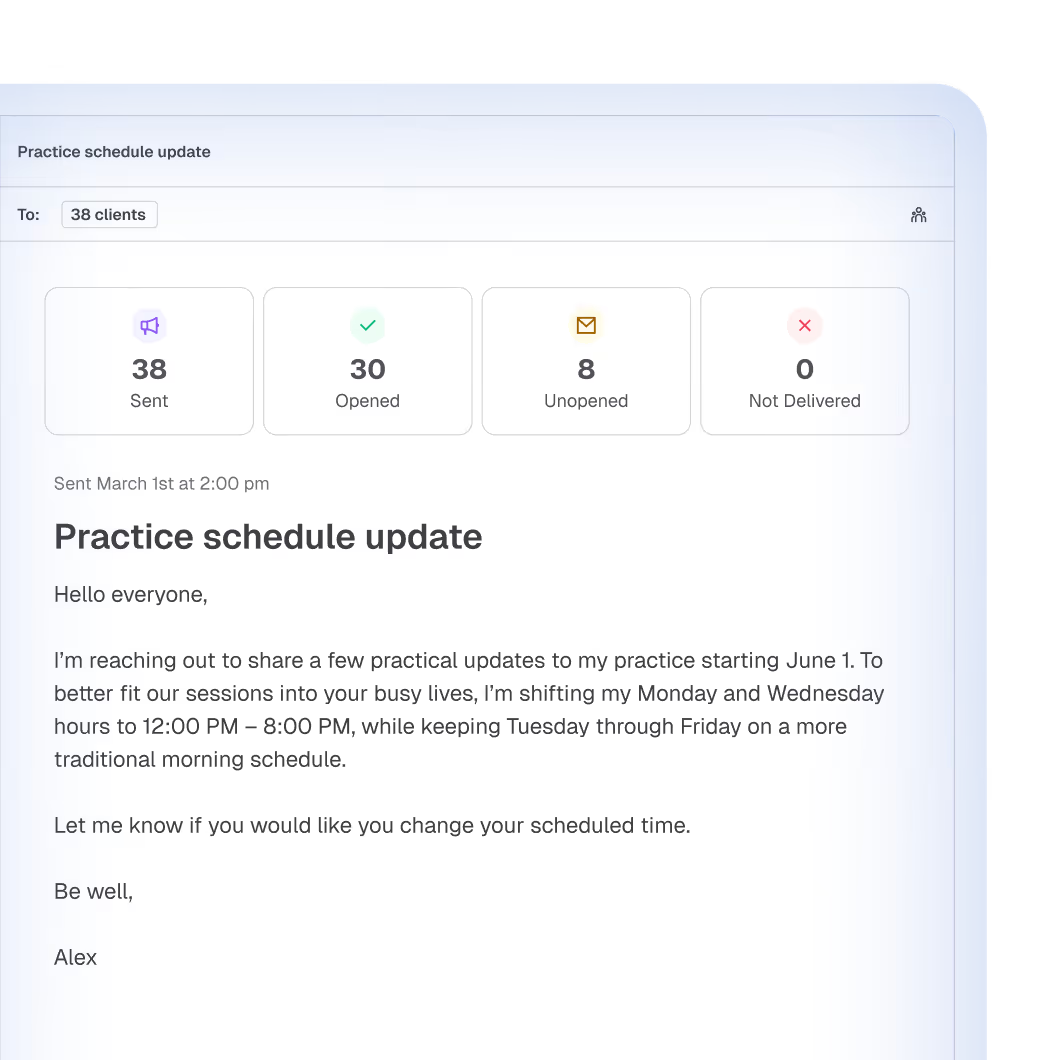
Announcements in Upheal do this in one click. You write the message once, pick who it goes to (all clients, or a selected group), and it lands as a real notification in each client's phone, with the message in their portal. You can see who has read it. You can reuse the same recipient list for the follow-up.
Most other EHRs either do not offer this at all, or hide it behind their most expensive plan with significant feature limitations. Announcements are part of Upheal Premium because client communication is not a luxury feature. It is what messaging is for.
3. A real client mobile app, with push notifications
Your clients get notified on their phone the moment you message them, and they can read and reply without logging in to anything. The Upheal client portal is a native iOS and Android app, not a mobile web page pretending to be one. Push notifications are the difference between a message that arrives and a message that gets read.
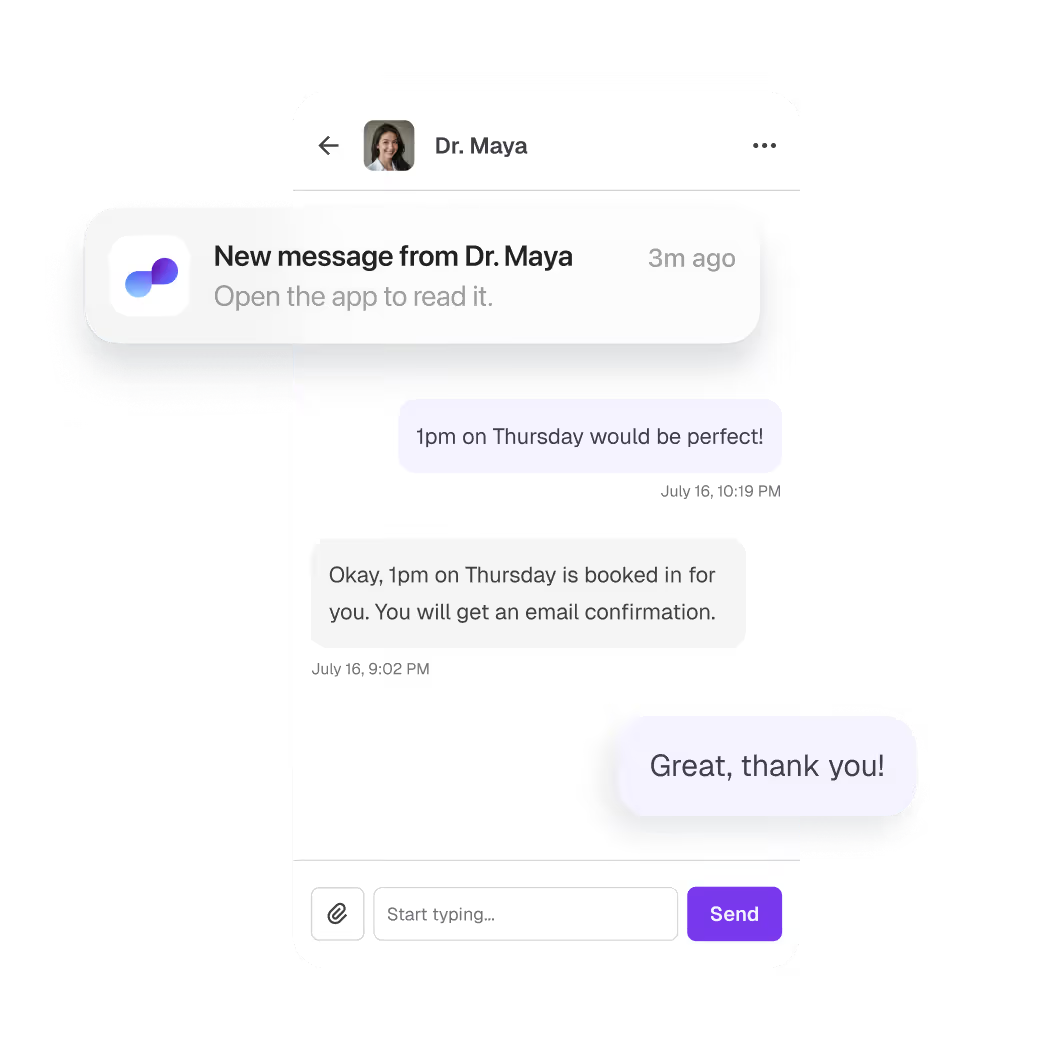
This sounds basic. It is. It is also missing from most of the EHRs your prospects are comparing you against.
Five ways therapists are using Upheal Messaging
Here is what real workflows look like with this live in your account.
Closing for vacation
You are taking off Memorial Day weekend through the following Friday. You open the Announcements tab, write a four-sentence note (or ask Assistant to draft one for you, with your standard "out of office" tone), select "All clients," and send. Every client gets it as a push notification on their phone. The ones who read it see "Read" on your end, so you know your message landed.
What this replaces: an evening of copy-paste across thirty individual threads, or a mass email that half your clients miss because it lands in the promotions folder.
Raising your rates
You are increasing your private pay rate by $15, effective in 60 days. This is the kind of message you write once, send to everyone, and hope they read. You compose the announcement, ask Assistant to soften the tone (it adjusts to sound warm without losing the message), select your private-pay clients, and send. You get a per-client read list, so you can do a quick 1:1 follow-up with anyone who has not opened it after a week.
What this replaces: an awkward call, a generic email blast, and the lingering worry that someone is going to be surprised at their next session.
Between-session check-in on homework
Your client mentioned last session that they would try a thought record between sessions. Three days later, they message you: "Hi, I tried the worksheet but I am not sure I am doing it right. Can you give me an example?"
You open the conversation, click "Draft with Assistant," and a reply appears. It references the worksheet you assigned, the goal it ties to (a specific item in their treatment plan around cognitive restructuring), and an example written in plain language. You read it, tweak one sentence to sound more like you, and send. Three minutes, end to end.
What this replaces: opening their chart, re-reading last week's note, finding the worksheet, writing a fresh example from memory, and second-guessing whether you covered the right material. Or worse, telling them you will follow up later and forgetting.
A difficult or sensitive reply
A client sends a message at 11pm that is frustrated, possibly testing a boundary, and needs a careful response. You do not want to fire something off on instinct, and you do not want to leave them without a reply until your next session.
You open Assistant, ask it to draft a reply that "acknowledges their frustration, holds the boundary we set in session three weeks ago around between-session contact, and offers to discuss it at our next session." Assistant references the boundary conversation in your prior notes and drafts a response. You read it, adjust one phrase, send. The boundary stays consistent. You did not have to rebuild the context in your head at 11pm.
Keeping every client conversation tracked (group practices)
You run a practice with eight clinicians and 280 clients. You know the moment client messages start falling through the cracks, retention drops. Every Upheal inbox surfaces unread and un-answered conversations at the top, so each clinician can see what is still open at a glance.
Every clinician on your team can ask Upheal Assistant about their own caseload in plain language. "Which of my clients haven't heard from me in 14 days?" "Which conversations are still waiting for my reply?" "When did I last message Sarah?" You get a straight answer in seconds, without scrolling through the inbox or building a tracking spreadsheet on the side.
The same standard for client communication is applied across the team, even when caseloads spike. Combined with Announcements, your clinicians have one consistent toolkit, and you set the bar once. (Practice-wide rollups across the whole team, like response-time averages or unanswered messages by provider, are on the roadmap.)
Start free, no credit card required. Set up Messaging in under a minute and try Assistant-drafted messages on a test client.
Built for solo therapists and group practice owners
Upheal Messaging works the same way whether you are solo or running a team. For a solo practitioner, it consolidates client communication into one place and uses the Assistant you already trust to draft any client message. For a group practice owner, it gives every clinician on your team the same tool, the same brand-aligned messaging surface, and the same per-client controls, with a path toward team-wide visibility on roadmap.
If you are a solo therapist switching from another EHR, Upheal Messaging removes a stack of separate tools. No more separate mass email tool. No more "log in to the portal to check messages" friction. No more $99/month plan tier to unlock Announcements.
If you are scaling from solo to group, you get a messaging surface that does not need to be ripped out and replaced as you grow. Per-clinician inboxes, per-client controls, and a single brand-aligned client experience. (Internal team chat between clinicians is on the near-term roadmap. We will talk about what is coming below.)
For more on how Upheal supports growing teams, see our work with group practices and our analysis of the best EHR for private practice in 2026. To see how Upheal Messaging fits into the broader platform, visit the Upheal client portal feature page.
How we built it for privacy and trust
Standard text messaging is not HIPAA compliant. SMS messages are unencrypted, not stored in an auditable system, and offer no BAA pathway with carriers. For a messaging tool to meet HIPAA requirements, it needs end-to-end encryption, a signed Business Associate Agreement, access controls, and audit logging. Most EHRs address this with a basic secure portal, which technically meets the standard but rarely gets used because logging into a separate web page to check a message is too much friction for most clients.
Here's how Upheal Messaging is built differently.Client messaging is the single most sensitive surface in any therapy product, full stop. Messages can contain crisis language, medication information, family details, and clinical observations. Every design choice in Upheal Messaging was made with that in mind.
Off by default. Messaging is disabled when you create your account. You turn it on in Settings, and you can enable or disable it per client at any time.
HIPAA compliant, SOC 2 certified. Every message is encrypted in transit and at rest, with record-level encryption inside our database, so even at the storage layer messages are isolated per record. We have a Business Associate Agreement on file with every paying customer. Our security posture is documented on our privacy and compliance page. For the underlying regulation, the HHS HIPAA Security Rule describes the standards we are built against.
Biometric protection on the client app. Clients can enable Face ID or fingerprint authentication on the Upheal portal app, so sensitive conversations are protected even if their device is unlocked or shared.
PHI never touches email. Email is used for notifications only, with no protected health information in the body. The full message lives inside Upheal's encrypted environment.
You control AI involvement. Assistant-drafted messages are a tool, not a default. You can use Assistant on every message, on some messages, or never. Every drafted message is reviewed and sent by you, the clinician. We do not auto-send. We do not auto-reply. We do not silently use client data to train external models.
Blocking and per-client controls. If a specific client should not be able to message you, you can block messaging for them without changing your global setting. The control is granular by design.
What is shipped today and what is next
Shipped in this release:
- Secure 1:1 messaging with read receipts and conversation organization
- Announcements (bulk messages) with per-client read tracking
- Assistant-drafted messages grounded in your clinical record
- Native iOS and Android client app with push notifications
- Per-client messaging controls and global on/off toggle
- HIPAA, SOC 2, BAA, encrypted in transit and at rest with record-level encryption
Coming soon:
- Attachments in messaging. Send worksheets, homework, PDFs, or session summaries directly in the thread.
- Clinician-to-clinician messaging. Internal team messaging for group practices, in the same inbox as client conversations, with role-aware routing.
- Messaging in the therapist app. Read and reply to client messages from your phone, with the same Assistant drafting flow available on the go.
We will publish each of these on the Upheal roadmap as it ships.
A messaging tool that finally earns its place
The bar for "client messaging in an EHR" has been a HIPAA-compliant text box for years. That bar is too low. The reason therapists default back to email, text, and missed messages is that the alternative has never been worth the friction.
Upheal Messaging is built for the way therapists actually work. Your Assistant knows your clients. Your clients have a real app. Your announcements reach everyone in one click. The whole surface is encrypted, off by default, and under your control.
If you are tired of running client communication across five tools, or paying for a premium plan to unlock a feature that should have been standard a decade ago, we built this for you.
Start free at upheal.io/signup. Set up Messaging in under a minute and try Assistant-drafted messages on your next client.
Frequently asked questions
Is Upheal Messaging HIPAA compliant?
Yes. Upheal Messaging is HIPAA compliant and SOC 2 certified. Every message is encrypted in transit and at rest, PHI never touches email, and a Business Associate Agreement is included with every paying Upheal account.
Can therapists send bulk messages to all clients at once?
Yes. Upheal Announcements lets you send one message to your entire caseload, or to a selected group, in a single click. You can see per-client read receipts and track who has opened the message.
Does Upheal have a client app for receiving messages?
Yes. Clients receive messages through the Upheal client portal, a native iOS and Android app with push notifications. Clients do not need to log into a web portal to read or reply.
What is the best HIPAA compliant messaging app for therapists?
A good HIPAA compliant messaging app for therapists should include end-to-end encryption, a BAA, a real client mobile app with push notifications, and ideally, clinical grounding so the tool understands your clients' records. Upheal Messaging includes all of these. See how it compares to a standard EHR inbox.
How is Upheal Messaging different from regular EHR secure messaging?
Most EHR secure messaging is a locked portal thread with no clinical context. Upheal Messaging connects your messages to the Upheal AI Assistant, so you can ask it to draft any client message using your session notes, treatment plan goals, and assessments. The draft is ready in seconds. You review and send.
Is Upheal Messaging included in the base plan?
Upheal Messaging is available on Upheal Premium, which starts at $1 per session with a $69/month cap. There are no separate plan tiers to unlock messaging or announcements. See full Upheal pricing.